RemakeFace : AI Face Swap
- 3.8
- Rating
- 1.00M
- Installs
- Free
- Price

 Analysis by App-foxy
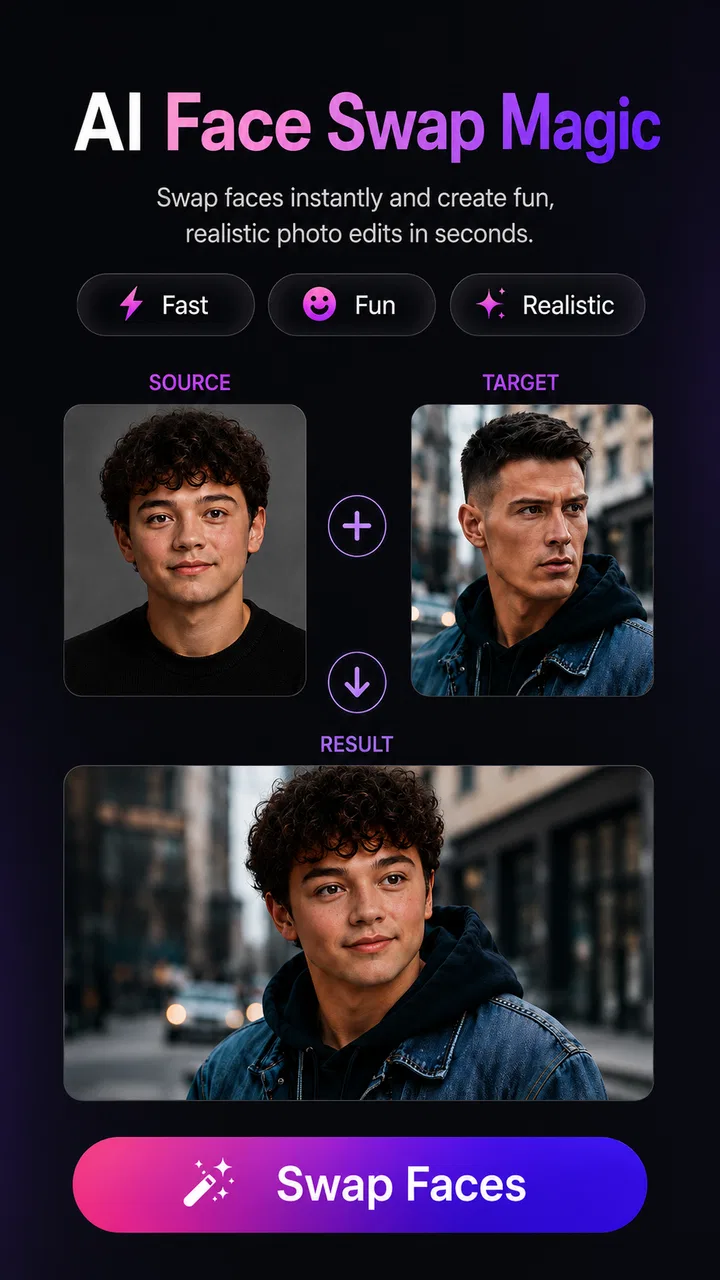
I tried RemakeFace: AI Face Swap as a quick photo-editing tool rather than treating it like a full creative suite, and that distinction matters. Its main appeal is simple: it uses AI to place one face into another image without adding a watermark or asking me to spend coins for each result. For a shared phone or a household that occasionally wants to make a playful birthday image, a themed portrait, or a harmless joke, that direct approach is easy to understand.
The app belongs to the photography category and comes from Sarana Creative Studio. It is free to install, rated for Teen users, and works on devices running Android 7.0 or later. The current version is 1.2.8, while optional purchases range from $2.99 to $29.99 per item. Those details give a useful picture of its position: this is an accessible mobile editor, but not necessarily a private, child-focused family tool or a replacement for professional retouching software.
How RemakeFace fits into a shared household
The most convincing use case for me is occasional shared-device editing. Imagine a family preparing a digital invitation, making a funny image for a group chat, or comparing different looks for a costume idea. One person can open the app, choose the source material, and pass the phone to someone else without needing a complicated editing lesson. The face-swap concept is immediately recognizable, so the learning curve feels lighter than it would with layers, masks, and manual selection.
You May Also Like

 Blood Strike: 2.5 Anniversary
Blood Strike’s Loadouts Turn Every Drop Into a Tactical Gamble
A close look at Blood Strike’s custom loadouts: how fast access to signature weapons reshapes its battle royale rhythm, rewards preparation, and narrows the gap between fights.

 Pandora - Music & Podcasts
Pandora’s Music Is Easy to Start, but Harder to Recover
Pandora’s strength is its low-effort path from a seed to a station. Its weak spot is how much confidence it asks you to place in connection, setup, and quiet recovery.

 8 Ball Pool
 Is Built on Rivalries, Rematches, and Routine
A close look at the rivalries, rematches, shared routines, and unanswered safety questions that turn a quick pool match into a persistent mobile community.

 Samsung Music
’s Quiet Strength Is Playing What You Already Own
Its reach comes less from spectacle than from dependable access to a personal library. That simplicity is both the app’s strongest retention engine and its ceiling.

 AccuWeather: Weather Radar
AccuWeather Review: A Quick, Clear Forecast for Everyday Decisions
For everyday plans, the best forecast is the one you can understand quickly. AccuWeather makes rain timing, radar, and local conditions easy to act on, with a few trade-offs.

 Hill Climb Racing
Why Hill Climb Racing Still Turns Crashes Into One More Run
A tiny car, a bumpy hill and one more upgrade: Hill Climb Racing keeps resurfacing because its simple chaos makes every near-miss feel personal.
More From Our News Desk



That simplicity also creates a useful boundary. I would not hand the phone to a young child and assume the app is automatically suitable just because the basic idea looks playful. Its Teen content rating should guide the household conversation, especially when the device is shared by children and adults. A parent or guardian can decide when it is appropriate, but the app itself should not be treated as a substitute for supervision or family rules.
For adults sharing a tablet or phone, the workflow is more comfortable when each person agrees on which photos may be used. Face swapping involves recognizable people, so the social question comes before the editing question. I found that the best results and the fewest awkward moments come from using images where everyone understands the intended joke and where the finished picture will be sent.
The strongest household rule is simple: get permission before editing or sharing another person’s face. That is especially important when the result could be mistaken for a real photograph. A funny private image and a misleading public post are not the same thing, even if they were created with the same button.
Starting without turning the phone into a permanent editing station
Because the app is free, it is easy to try without making an immediate purchase decision. I would still approach installation as a short test: check whether the interface feels comfortable, create one or two harmless images, and then decide whether it deserves a regular place on the device. This is a better habit than installing it on every family member’s phone simply because the concept sounds entertaining.
The no-watermark approach is one of its practical strengths. A visible mark can make a casual image feel unfinished, particularly when the result is meant for a private message, a digital card, or a small social post. Removing that distraction gives the finished picture a cleaner appearance. It does not, however, guarantee that every swap will look convincing; the quality still depends heavily on the photographs chosen.
I recommend starting with a clear, front-facing portrait and an image with similar lighting. A face turned sharply away, partly covered by hair, or photographed in deep shadow gives the AI less useful information. The same applies when the target image has strong color casts or a very different camera angle. This is a small but important workflow improvement: choosing compatible images often helps more than repeatedly pressing the same editing control.
On a shared device, I would also avoid leaving personal photos open in the recent-image area. That is not a special feature of this app; it is simply sensible phone hygiene. If several people use the same device, select images deliberately, review the final result before saving or sending it, and close the app when finished. The extra few seconds help prevent the wrong photo from being edited or shared.
Coordinating edits when several people are involved
RemakeFace works best when one person acts as the editor and another person acts as the reviewer. The editor can concentrate on selecting the faces and creating the image, while the reviewer checks whether the result looks natural enough and whether it is appropriate to share. This two-person routine is surprisingly useful for household projects because the person making the swap may become accustomed to small visual errors.
Those errors can appear around hairlines, glasses, jaw edges, skin tone, and the direction of light. A swap may look amusing at first glance but less believable when viewed closely. I would zoom in before sending anything, particularly if the image includes someone who did not make the edit themselves. If the face appears stretched or the expression feels disconnected from the body, choosing a different source image is usually faster than trying to rescue a poor match.
A second practical tip is to keep the purpose of the image in mind. A deliberately silly result can tolerate mismatched lighting because the joke is obvious. A family invitation or commemorative picture needs more care, and a manual editor may be better if precise control matters. The app is strongest when speed and playful experimentation are more important than pixel-level refinement.
There is also a useful distinction between creating and distributing. The app can help produce an image, but the household still needs its own agreement about where that image goes. I would separate private experiments from images intended for a group chat or public profile. This makes coordination easier and reduces the chance that an unfinished or embarrassing result travels farther than intended.
Age, trust, and the limits of a playful interface
The Teen rating is an important part of the decision. Face editing can be harmless, but it can also be used to embarrass someone, imitate a person without consent, or create an image that causes confusion. Younger users may understand the joke but not fully anticipate how quickly a shared image can be copied or misunderstood. That is why I see this as an app for guided use in a mixed-age household, not an unrestricted toy for every family member.
I would explain three boundaries before allowing a child or teenager to use it. First, only use faces with permission. Second, do not make an edit that presents a real person in a humiliating or suggestive situation. Third, label an obviously altered image when someone outside the immediate joke might mistake it for a genuine photograph. These rules are more valuable than any single editing trick because they address the real risk: how the result affects another person.
Trust also matters between adults. A shared phone may contain work portraits, private family pictures, or images saved for completely different reasons. If the device has several users, I would ask before opening someone else’s gallery and avoid browsing beyond the image needed for the edit. RemakeFace may be quick to use, but quick access should not become permission to inspect every photo on the device.
The app’s free entry point makes experimentation approachable, while the optional purchases deserve a moment of attention in a household setting. Since individual items can cost from $2.99 to $29.99, I would keep purchase decisions with the device owner and explain that “free” does not mean every optional element will necessarily remain free. For a family phone, that small conversation prevents a playful editing session from becoming an unwanted spending issue.
Where it beats ordinary alternatives, and where it does not
Compared with a conventional photo editor, RemakeFace removes much of the manual work. A traditional editor can offer more control over selection edges, blending, color correction, and retouching, but it also asks the user to understand tools that are unnecessary for a quick face-swap joke. If I want a result in a few moments and do not need to adjust every pixel, the AI-centered workflow is more approachable.
Compared with a social network’s built-in effects, the dedicated photography focus feels more intentional. I can think about the source image and the final composition instead of treating the swap as one temporary camera effect. The no-watermark result is another advantage when I want a cleaner saved image rather than a branded overlay.
However, a general editor remains the better choice for careful work. If the image needs exact facial alignment, subtle retouching, professional color matching, or a polished composite, I would move to a tool with manual controls. AI can make a convincing first pass, but it does not replace judgment. It may prioritize a recognizable face while overlooking the way shadows, neck position, hair, or body posture should connect.
I would also skip this app when the goal is a serious identity-sensitive image. A face swap can be entertaining in an obviously fictional context, but it is a poor choice for anything that could misrepresent where someone was, what they did, or how they appeared. In those situations, the problem is not whether the output looks good; the problem is whether creating it is fair and responsible.
Small workflow choices that improve the results
My first useful habit is to prepare a small set of suitable photos before opening the editor. I look for similar head angles, comparable brightness, and expressions that will not clash. This reduces trial and error and makes the process more manageable on a shared device, where another person may be waiting to use the phone.
My second habit is to judge the image at two distances. At thumbnail size, I check whether the joke or idea reads clearly. Then I inspect the face more closely for obvious seams, unnatural proportions, or a mismatch between skin color and surrounding light. An image can pass one test and fail the other, so using both views gives me a more honest decision than relying on the first impression.
My third habit is to save the least sensitive version of an experiment. If the result is only needed for a family message, I would avoid using a private portrait that reveals more than necessary. A simple, ordinary photo is often enough. This keeps the creative activity separate from personal material that should not circulate.
One more trade-off is worth noting: speed can encourage overproduction. When an app makes variations easy, a household may create many images without deciding which ones are actually worth keeping. I prefer to make a few deliberate attempts, delete the weak results, and share only the final choice. That keeps the gallery cleaner and makes the editing session feel purposeful rather than noisy.
Who should install it, and who should look elsewhere
I think RemakeFace is a good fit for adults and supervised teenagers who want quick, playful photo experiments without a watermark or a coin-based step for every basic result. It is especially useful for casual household projects, themed greetings, inside jokes, and testing how different faces might look in the same composition. Its straightforward concept also suits people who do not want to learn a full editing application.
I would point photographers, designers, and anyone preparing an important image toward a more controllable editor. They may appreciate the speed of an AI swap as a starting point, but they will probably want manual refinement afterward. I would also advise caution for families seeking a dedicated child-safe environment, private profiles, or built-in household controls. The Teen rating means the decision should be made with age and supervision in mind.
The app has enough public interest to be easy to recognize in the photography space, with an average rating of 4.3 from around 45 thousand ratings and more than a million installs. I see that as a sign that the basic idea connects with many users, not as proof that every face swap will be successful. Results vary with the source material, and personal expectations matter: a quick joke and a flawless composite demand very different standards.
My household verdict
After using it as a practical, occasional editor, I see RemakeFace as a focused tool with a clear advantage: it makes AI face swapping approachable and keeps the saved result free of a watermark. The free starting point lowers the barrier to trying it, while the current version and support for older Android devices make it accessible to a broad range of phones.
My recommendation comes with boundaries. In a shared household, agree on whose faces may be used, keep purchase decisions with the device owner, respect the Teen rating, and review every image before it leaves the phone. Those habits matter more than creating the most dramatic result. If everyone treats the app as a creative utility rather than a license to manipulate anyone’s photo, it can be a fun addition to a family device.
For me, the final decision is straightforward: install it if you want fast, casual face-swap experiments and are comfortable using your own judgment about consent and sharing. Skip it if you need detailed manual control, professional compositing, or a child-oriented environment with dedicated family boundaries. Its best role is a quick household creativity tool, not an all-purpose photo studio.
FAQs for RemakeFace : AI Face Swap
01What is RemakeFace: AI Face Swap, and how does it work?
RemakeFace: AI Face Swap is an innovative app that lets users seamlessly swap faces in photos and videos using advanced AI technology. It analyzes facial features and maps them onto another face, creating realistic and fun results. The app is user-friendly, making it accessible for both casual users and enthusiasts.
02Is RemakeFace: AI Face Swap safe to use with my personal photos?
Yes, RemakeFace: AI Face Swap takes privacy seriously. The app processes images directly on your device, ensuring that your photos are not uploaded to external servers. Additionally, it offers privacy settings to control data usage, ensuring your personal images remain secure.
03Does RemakeFace: AI Face Swap support video face swapping?
Absolutely! RemakeFace allows users to swap faces not just in static images but also in videos. This feature leverages its powerful AI to track facial movements, providing a dynamic and realistic swapping experience in your video content.
04Can I use RemakeFace: AI Face Swap on all devices?
RemakeFace: AI Face Swap is available for both Android and iOS platforms, supporting a wide range of devices. However, for the best performance, it is recommended to use the app on devices with updated operating systems and sufficient processing power to handle the AI computations.
05Are there any in-app purchases or subscription models in RemakeFace: AI Face Swap?
Yes, while the basic features of RemakeFace: AI Face Swap are free, there are optional in-app purchases and subscription models available. These unlock premium features such as enhanced face swap effects, ad-free experience, and access to exclusive content, providing users with a more comprehensive experience.
Pros
- Intuitive interface for easy navigation.
- High-quality face swap results.
- Supports multiple image formats.
- Fast processing time for swaps.
- Regular updates with new features.
Cons
- Requires internet for best performance.
- Limited free features available.
- Occasional app crashes reported.
- In-app ads can be intrusive.
- Some swaps may lack realism.

RemakeFace : AI Face Swap
Gallery